
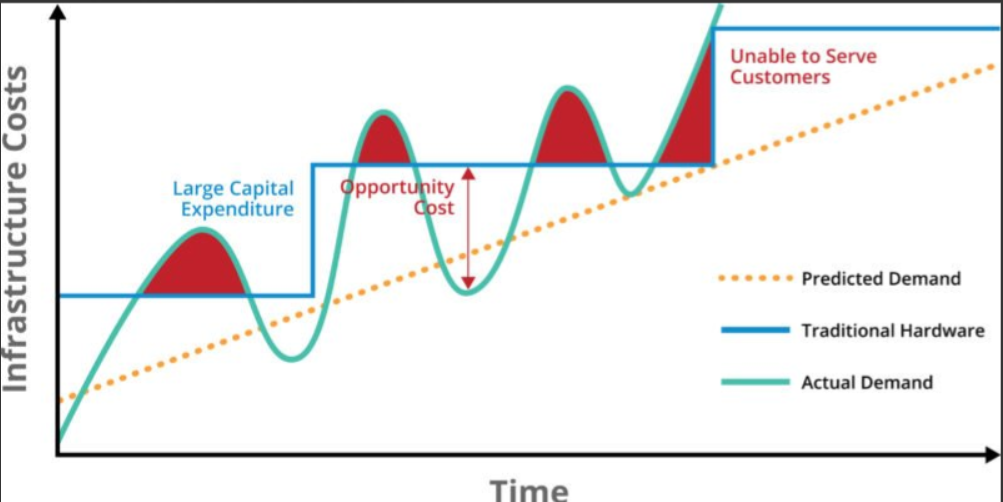
Cloud Rightsizing is the process of continuously aligning cloud resource sizes, performance profiles, and quantities with the actual operational demands of your workloads.
In traditional on-premises data centers, over-provisioning was a common defense mechanism to handle rare performance spikes and avoid downtime. In the cloud, however, static over-provisioning creates massive financial waste. Rightsizing bridges the gap between estimated capacity and real-time application utilization.
The 4 Steps of the Rightsizing Process
Rightsizing is an ongoing operational discipline, not a one-time project. Enterprise engineering teams implement rightsizing using a systematic four-stage framework:
+--------------------------------------------------------------------------+
|                      THE RIGHTSIZING LIFECYCLE                           |
+--------------------------------------------------------------------------+
|  1. MONITOR    --> Collect continuous CPU, Memory, I/O, & Network metrics|
|  2. IDENTIFY   --> Detect idle, underutilized, or bottlenecked resources |
|  3. MODIFY     --> Downsize, upgrade, or switch instance families        |
|  4. AUTOMATE   --> Enforce auto-scaling guardrails to prevent regression |
+--------------------------------------------------------------------------+
Step 1: Gather Comprehensive Telemetry
To avoid cutting capacity so aggressively that performance degrades, rightsizing decisions must be based on at least 14 to 30 days of continuous utilization metrics:
-
CPU Utilization: Average vs. peak usage (look for systems running $<15\%$ average CPU).
-
Memory Utilization: Memory consumption is critical; unlike CPU, running out of RAM causes immediate Out-Of-Memory (OOM) crashes or heavy disk swapping.
-
Storage I/O & Network Throughput: Ensure that downsizing an instance type does not accidentally throttle disk IOPS or network bandwidth required by databases.
Step 2: Identify Candidate Resource Vectors
Analyze metrics to place workloads into clear rightsizing categories:
-
Idle / Zombie Resources: Virtual instances or databases with $<1\%$ activity over 14 days. These should be terminated or snapshotted and archived.
-
Over-Provisioned Workloads: Systems where peak resource utilization stays below 30–40%. These instances are prime candidates to be downsized by one or two tiers.
-
Under-Provisioned Bottlenecks: Systems operating near 90–100% capacity where performance degradation occurs. These require scaling up or moving to specialized instance families (e.g., Memory-Optimized).
Step 3: Select the Right Optimization Pathway
Rightsizing involves several technical approaches beyond simply reducing core counts:
                  +--------------------------------------+
                  |      RIGHTSIZING STRATEGIES          |
                  +--------------------------------------+
                                     |
       +-----------------------------+-----------------------------+
       |                                                           |
       v                                                           v
[ VERTICAL SCALING ]                                       [ ARCHITECTURE MODERNIZATION ]
Downsizing/Upscaling within same family                    Migrating to modern ARM chips
(e.g., m5.2xlarge -> m5.xlarge)                            (e.g., x86 -> AWS Graviton / Azure Ampere)
-
Vertical Downsizing: Moving from an 8-vCPU instance (
m5.2xlarge) to a 4-vCPU instance (m5.xlarge) within the same instance generation. -
Cross-Family Migration: Shifting workloads to specialized hardware types. For example, moving a high-memory database from a General Purpose instance (
m5) to a Memory-Optimized instance (r5). -
Processor Architecture Upgrades: Migrating workloads from legacy x86 architectures (Intel/AMD) to ARM-based cloud processors (AWS Graviton or Azure Ampere Altra), delivering up to 40% better price-performance at the same capacity tier.
Step 4: Automate and Prevent Capacity Creep
Static rightsizing eventually degrades as developers introduce new code and workloads grow.
-
Implement Auto-Scaling Groups (ASGs) that scale compute nodes horizontally in response to real-time traffic spikes, scaling back down during off-peak hours.
-
Use native advisories (AWS Compute Optimizer, Azure Advisor, GCP Recommender) to continuously scan infrastructure for rightsizing opportunities.
Rightsizing Matrix Across Major Resource Types

| Resource Type | Over-Provisioned Indicator | Recommended Optimization Action |
| Compute (VMs) | Avg CPU $<15\%$, Peak $<30\%$ over 30 days | Downsize instance size tier or migrate to ARM architecture. |
| Kubernetes Pods | CPU/RAM requests set significantly higher than actual usage |
Adjust Pod requests & limits using Vertical Pod Autoscaler (VPA). |
| Block Storage | Allocated volume size large, but $<20\%$ disk space used | Reduce allocated disk size or transition to lower-tier storage types. |
| Databases | Buffer cache hit ratio high, low IOPS utilization | Scale down database instance tier or switch to serverless auto-scaling modes. |