
Infrastructure as Code (IaC) allows engineering and operations teams to automate, provision, and manage cloud infrastructure using machine-readable configuration files rather than manual console clicks.
Among declarative IaC solutions, HashiCorp Terraform (now managed under IBM) and AWS CloudFormation represent two of the most widely adopted platforms. While both automate the full infrastructure lifecycle, they embody fundamentally different operational models: multi-cloud flexibility via explicit client-side state management versus AWS-native deep integration with fully managed service-side state.
1. Architectural Philosophy & Language
+--------------------------------------------------------------------------+
|                        IaC SYNTAX & DOMAIN SCOPE                         |
+--------------------------------------------------------------------------+
| TERRAFORM      --> Multi-Cloud / Providers  --> HCL (HashiCorp Config)   |
| CLOUDFORMATION --> AWS-Exclusive Native      --> YAML or JSON Templates   |
+--------------------------------------------------------------------------+
Terraform: Multi-Cloud Flexibility with HCL
Terraform relies on HashiCorp Configuration Language (HCL), a human-readable declarative syntax designed specifically for resource provisioning.
-
Cloud Agnostic (Provider-Based): Terraform provisions resources across AWS, Azure, GCP, Kubernetes, GitHub, Cloudflare, and over 3,000+ third-party service providers using modular plugins.
-
Unified Tooling: Teams manage multi-cloud platforms, networking layers, and SaaS services inside a single codebase.
Terraform
# Terraform HCL Example (AWS S3 Bucket)
resource "aws_s3_bucket" "app_data" {
  bucket = "my-company-app-data-bucket"
}

resource "aws_s3_bucket_public_access_block" "app_data" {
  bucket                  = aws_s3_bucket.app_data.id
  block_public_acls       = true
  block_public_policy     = true
  ignore_public_acls      = true
  restrict_public_buckets = true
}
AWS CloudFormation: AWS-Native Service Integration
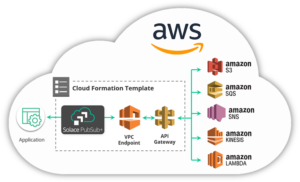
CloudFormation is an AWS-native service that processes raw YAML or JSON templates.
-
AWS-Exclusive Focus: Native focus on AWS infrastructure with first-party support for AWS features.
-
Verbose Syntax: Requires verbose syntax using intrinsic functions (e.g.,
!Ref,!Sub,!GetAtt). Note: AWS also provides the AWS Cloud Development Kit (CDK), which allows developers to write constructs in Python, TypeScript, or Go that synthesize into underlying CloudFormation templates.
YAML
# CloudFormation YAML Example (AWS S3 Bucket)
Resources:
  AppDataBucket:
    Type: AWS::S3::Bucket
    Properties:
      BucketName: my-company-app-data-bucket
      PublicAccessBlockConfiguration:
        BlockPublicAcls: true
        BlockPublicPolicy: true
        IgnorePublicAcls: true
        RestrictPublicBuckets: true
2. State Management: The Single Biggest Operational Difference
State management represents the core operational divergence between the two tools.
                  +--------------------------------------+
                  |      STATE MANAGEMENT ARCHITECTURE   |
                  +--------------------------------------+
                                     |
       +-----------------------------+-----------------------------+
       |                                                           |
       v                                                           v
[ TERRAFORM CLIENT-SIDE STATE ]                             [ CLOUDFORMATION MANAGED STACK ]
* Explicit `.tfstate` file generated                        * Zero state files managed by user
* Requires S3 backend + locking (DynamoDB/S3)               * AWS manages stack state internally
* Enables precise local `terraform plan` diffs               * Automatic deployment rollback on failure
Terraform State Management
-
State File Dependency: Terraform records mappings between your HCL code and real-world infrastructure inside a
.tfstatefile. -
Operational Responsibility: Teams must configure a durable remote backend (such as an Amazon S3 bucket with S3 state locking or HashiCorp Cloud) to prevent state file corruption during concurrent runs.
-
Granular State Control: Allows engineers to manually inspect state, move or rename resources (
terraform state mv), and import pre-existing infrastructure (terraform import).
CloudFormation State Management
-
Fully Managed Stacks: CloudFormation maintains state inside the AWS cloud engine itself as an opaque “Stack”.
-
Zero Overhead: No state files, lock files, or backend storage S3 buckets to configure.
-
Automatic Rollback: If a resource fails to provision halfway through an execution, CloudFormation automatically rolls back the entire stack to its last known healthy state. (A failed
terraform applyleaves partially created resources that require manual cleanup).
3. Drift Detection and Execution Planning
Dry Runs: terraform plan vs. Change Sets
-
Terraform Plan: Running
terraform plangenerates a precise, immediate visual diff showing exactly which resources will be created, modified in-place, or destroyed. -
CloudFormation Change Sets: CloudFormation uses Change Sets to preview modifications before executing them, though generating and evaluating Change Sets requires interacting directly with AWS APIs.
Drift Detection
-
Terraform: Automatically refreshes its state against live cloud APIs on every
planorapplyexecution, immediately flagging out-of-band changes (drift). -
CloudFormation: Offers explicit on-demand Drift Detection (
detect-stack-drift), which scans stack resources and reports manual console changes.
4. Direct Comparison Matrix
| Feature / Criteria | HashiCorp Terraform | AWS CloudFormation |
| Provider Scope | Multi-Cloud (AWS, Azure, GCP, K8s, SaaS) | AWS Only |
| Language / Format | HCL (HashiCorp Configuration Language) | YAML or JSON (or synthesized via AWS CDK) |
| State Storage | User-managed remote state (S3, Terraform Cloud) | Fully managed internally by AWS Stack engine |
| Deployment Rollback | Manual intervention / state reconciliation | Automatic stack rollback on execution error |
| Execution Preview | Immediate local diff (terraform plan) |
CloudFormation Change Sets |
| Modular Ecosystem | Massively popular public Terraform Registry | AWS Service Catalog, Modules & CDK Constructs |
| Licensing / Cost | BSL (Open-source fork: OpenTofu); Free core CLI | Free (Included natively with AWS account) |
5. Decision Framework: When to Choose Which?
+--------------------------------------------------------------------------+
|                        SELECTION DECISION MATRIX                         |
+--------------------------------------------------------------------------+
| CHOOSE TERRAFORM      --> Multi-cloud strategy, unified developer IaC,   |
|                           explicit state control, rich modular registry.  |
|                                                                          |
| CHOOSE CLOUDFORMATION --> Pure-play AWS environment, zero state overhead, |
|                           deep integration with AWS Landing Zones & CDK. |
+--------------------------------------------------------------------------+
Choose Terraform (or OpenTofu) if:
-
You run or plan to run infrastructure across multiple cloud providers (AWS, GCP, Azure, Kubernetes, Cloudflare).
-
Your engineering team values cleaner dynamic syntax (for-loops, dynamic blocks, rich string functions) over verbose JSON/YAML.
-
You want a flexible, modular registry with community-tested architecture blueprints.
-
You require granular, programmatic control over infrastructure state management.
Choose AWS CloudFormation if:
-
Your organization is 100% committed to AWS with no multi-cloud requirements.
-
You want zero state file operational overhead—allowing AWS to handle locking, backups, state isolation, and rollbacks natively.
-
You rely heavily on native AWS governance frameworks like AWS Organizations, AWS Control Tower, or AWS Service Catalog.
-
Your developers prefer writing infrastructure in familiar programming languages via the AWS Cloud Development Kit (CDK).